Building a Production-Ready Python Template in a Weekend: My Claude Code Experiment
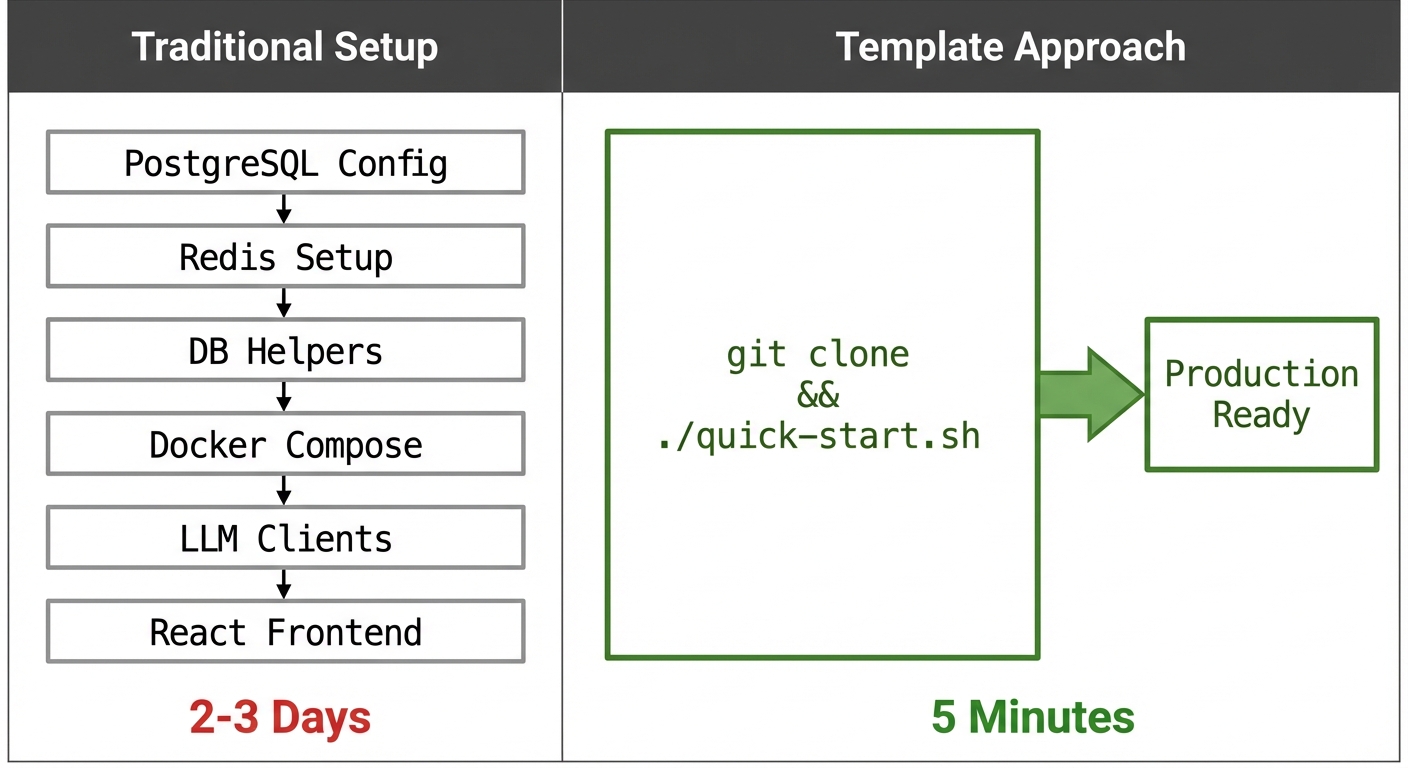
I've been building Python applications for years, and there's a pattern I keep running into: every new project starts with the same 2-3 days of infrastructure setup before I can write a single line of business logic. Configure PostgreSQL, wire up Redis, write async database helpers, set up Docker Compose networking, integrate LLM clients, scaffold a React frontend. It's not difficult work, but it's repetitive, and it delays getting to the interesting parts.
This past weekend, I decided to build a comprehensive project template that eliminates this overhead, and to use it as an opportunity to seriously explore Claude Code's capabilities for end-to-end system design and implementation.
The Technical Problem
My typical project stack includes:
- FastAPI for async API development
- PostgreSQL as the primary data store, often with PGVector for embedding similarity search
- MongoDB for document storage when schemas need flexibility
- Neo4j for relationship-heavy data (social graphs, knowledge bases)
- Redis for caching and as a Celery broker
- Celery + RabbitMQ for background task processing
- React + TypeScript for frontend work
Each of these requires boilerplate: connection pooling, session management, async context managers, health checks, graceful shutdown handlers. Multiply that across 6-7 services, add Docker Compose orchestration with proper networking and dependency ordering, and you're looking at substantial setup time.
I also had a secondary goal: local LLM inference. I've been increasingly conscious of sending data to cloud providers. For personal projects and experiments with sensitive data, I wanted the option to run everything locally (chat models, embedding generation, the full RAG pipeline) without any network calls to OpenAI, Anthropic, or Google.
What Prompted This Experiment
Two things pushed me to try this as a Claude Code project specifically.
First, Andrej Karpathy's recent thread about feeling "behind as a programmer" resonated with me. He described needing to master "agents, subagents, their prompts, contexts, memory, modes, permissions, tools, plugins, skills, hooks, MCP" - a new abstraction layer on top of traditional engineering. His framing of it as a "magnitude 9 earthquake" in the profession felt accurate.
Second, Boris Cherny (Claude Code's creator) posted about landing 259 PRs in 30 days: 497 commits, 40k lines added, all written by Claude Code. That's not a toy demo. That's production output at scale.
I wanted to understand what working this way actually looks like. Not the Twitter highlight reel, but the real workflow: context management, quality control, architectural decision-making.
The Development Process
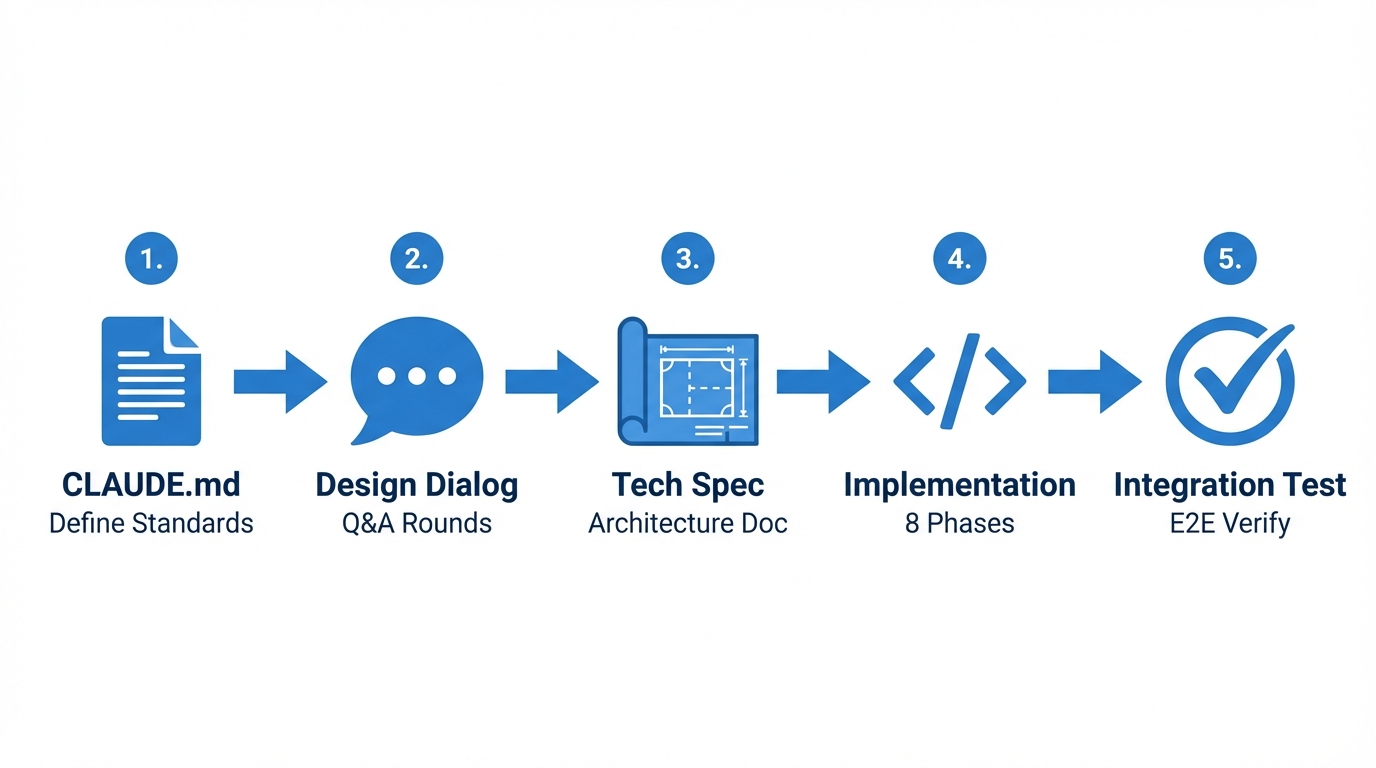
Phase 1: Establishing Constraints with CLAUDE.md
Before writing any code, I created a CLAUDE.md file defining my coding standards and preferences. This acts as persistent context that shapes Claude's output across sessions. Mine includes:
- Avoid "AI slop": unnecessary comments, excessive defensive coding, variables used only once
- Follow SOLID, DRY, KISS principles
- Maintain consistency with existing codebase style
- Specific debugging methodology (understand the issue before patching)
- PR description format
This file evolved throughout the project as I discovered patterns I wanted to encourage or discourage.
Phase 2: Requirements Through Dialogue
Rather than providing a complete spec upfront, I described the problem space and asked Claude to surface clarifying questions. This produced several rounds of technical discussion:
- Should database helpers use sync or async patterns? (Async throughout, with proper context managers)
- How should feature flags work: build-time via Docker Compose profiles, runtime via database, or both? (Both, with a two-tier system)
- Which ORM patterns for each database? (SQLAlchemy 2.0 for Postgres, Motor for MongoDB, Neomodel for Neo4j)
- How to handle LLM provider abstraction? (LiteLLM as unified interface, with direct client options for provider-specific features)
This phase required real engineering judgment. Claude can propose options, but selecting between them based on operational concerns and long-term maintainability is still human work.
Phase 3: Technical Design Document
I asked Claude to produce a comprehensive technical design document, detailed enough that a senior engineer could implement from it without additional context. Key requirements:
- Architecture diagrams using Mermaid
- Database schema definitions
- API endpoint specifications
- Service layer patterns
- Docker Compose configuration details
- Feature flag system design
We iterated on this document extensively. I manually edited sections where Claude's suggestions didn't match my mental model. The goal was a self-contained spec that could survive context window limitations.
Phase 4: Phased Implementation with Session Management
This is where context management became critical. I opened a fresh Claude session specifically to avoid the design discussion affecting implementation quality through context compaction.
Using the Opus model for planning, I asked Claude to break implementation into phases. It proposed 8:
- Core infrastructure (Docker Compose, base configurations)
- PostgreSQL + Redis helpers with async session management
- MongoDB and Neo4j helpers
- Celery + RabbitMQ background task infrastructure
- FastAPI application structure and health endpoints
- Feature flag system (build-time and runtime)
- Frontend scaffolding with admin dashboard
- LLM integration layer (cloud providers + Ollama)
For each phase, the workflow was:
- Implement with Claude (Sonnet for complex work, Haiku for straightforward tasks)
- Manual testing of the implemented functionality
- Update
IMPLEMENTATION_LOG.mdwith what was done, what worked, what failed - When context usage hit ~70%, start a new session with both the technical design doc and implementation log
The implementation log was crucial. It maintained continuity across sessions, documenting not just what was built but architectural decisions made along the way.
Phase 5: Integration Verification
Final validation: tear down all containers, run ./scripts/quick-start.sh from scratch, verify every service comes up healthy. This caught several issues with container startup ordering and health check timing that weren't apparent during incremental development.
The Resulting Template
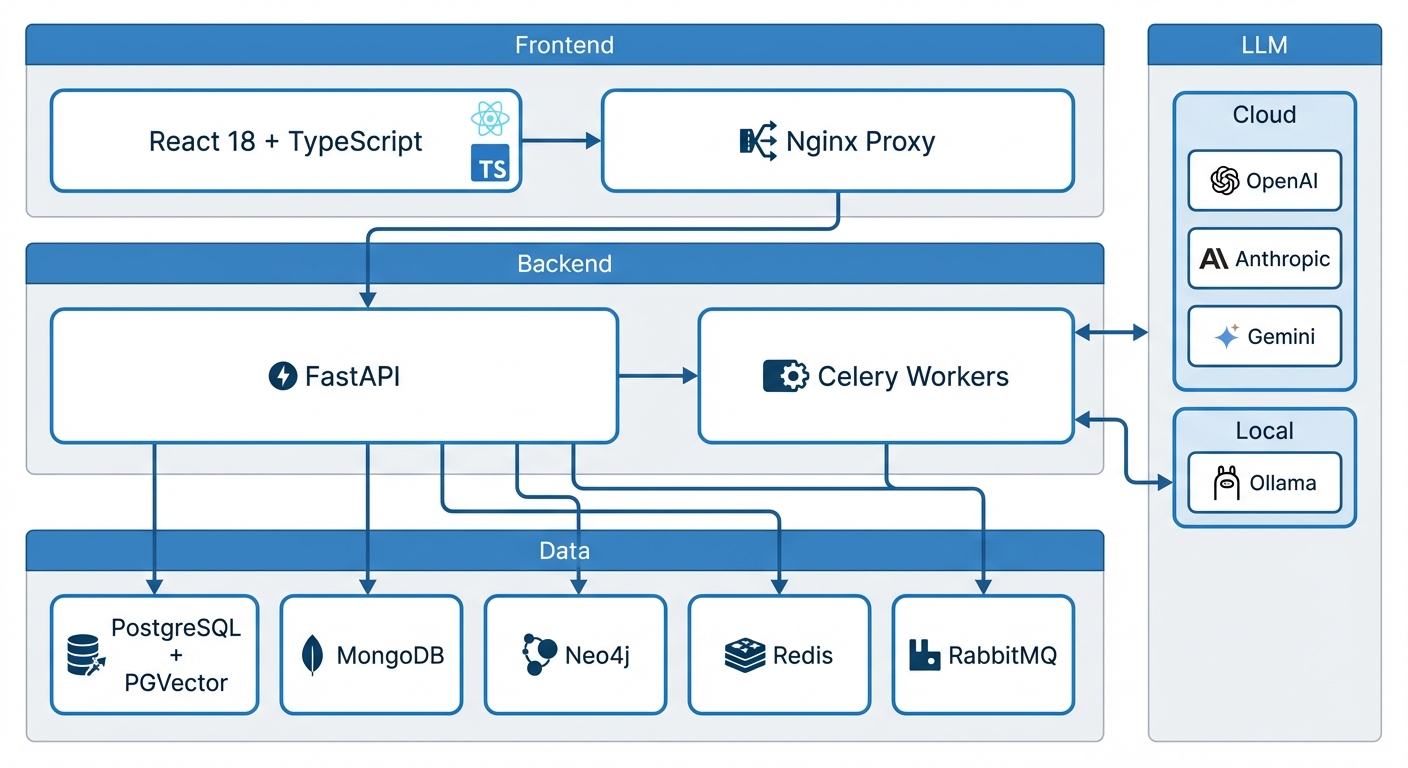
The template provides:
Backend (FastAPI)
- Async/await throughout with proper session lifecycle management
- Pydantic v2 for request/response validation
- SQLAlchemy 2.0 with asyncpg for PostgreSQL
- Motor for async MongoDB operations
- Neomodel for Neo4j graph operations
- Comprehensive health check endpoints for all services
Data Layer
- PostgreSQL 16 with PGVector extension for vector similarity search
- MongoDB 7 for flexible document storage
- Neo4j 5.15 for graph relationships
- Redis 7 for caching and Celery broker
Background Processing
- Celery 5.3 with RabbitMQ as message broker
- Celery Beat for scheduled tasks
- Proper task routing and retry configuration
LLM Integration
- LiteLLM as unified interface across providers
- Direct clients for OpenAI, Anthropic, Google Gemini
- Ollama integration for fully local inference (qwen2.5:7b for chat, nomic-embed-text for embeddings)
- No API keys required for local-only operation
Feature Flags
- Build-time flags via
features.envcontrolling Docker Compose profiles - Runtime flags stored in PostgreSQL, manageable via admin UI
- Decorator-based endpoint protection:
@require_feature("feature.vector_search")
Frontend
- React 18 with TypeScript
- Vite for fast HMR during development
- TailwindCSS for styling
- Admin dashboard for feature flag management and service health monitoring
DevOps
- Docker Compose with proper service dependencies and health checks
- Pre-configured profiles (minimal, fullstack, ai-local, data-platform, everything)
- Alembic migrations
- Hot reload for both backend and frontend
Observations on AI-Assisted Development
A few things became clear through this process:
Context management is a first-class concern. Knowing when to start fresh sessions, what documents to provide as context, how to structure prompts for continuity: this is a skill that matters. The IMPLEMENTATION_LOG.md pattern worked well for maintaining coherence across sessions.
Model selection matters. Opus for architectural planning and complex reasoning. Sonnet for substantial implementation work. Haiku for straightforward tasks and quick iterations. Using the right model for each task improved both quality and cost.
Code review doesn't go away; it intensifies. I read every file Claude produced. I pushed back on patterns I didn't like. I corrected judgment calls about where code should live, how errors should be handled, what abstractions were appropriate. The CLAUDE.md file evolved based on these corrections.
System design knowledge is more valuable, not less. Claude can generate code faster than I can type, but it can't make architectural trade-offs without input. The clarifying questions phase (choosing between sync and async, deciding on database patterns, designing the feature flag system) required engineering experience.
The work shifts rather than disappears. Less time typing, more time reviewing and directing. Less time on syntax, more time on system design and quality control. It's a different distribution of effort, not an elimination of it.
Try It
The template is at github.com/nitinnat/python-project-template.
git clone https://github.com/nitinnat/python-project-template.git
cd python-project-template
./scripts/quick-start.sh  # or: ./scripts/quick-start.sh ai-local
Available profiles:
fullstack(default): React frontend, FastAPI backend, Postgres+PGVector, Ollamaminimal: Backend + PostgreSQL + Redis onlyai-local: Full local LLM setup with Ollamadata-platform: All databases enabledeverything: All features (~15GB)
I'm actively improving the template. If you find issues or have suggestions, contributions are welcome.
This is my first technical post. I tend to get stuck optimizing for perfection and never ship anything, so I'm forcing myself to publish this as the year ends.
There's a lot I haven't explored yet: MCP servers, custom hooks, background agents, so on and so forth. I've only scratched the surface of what's possible. I plan to keep building projects that interest me and share what I learn along the way.
If you have questions about the approach or want to discuss the technical details, I'd be happy to connect.