AI-Assisted Coding: My Systematic Workflow with GitHub Copilot
The Problem
For the first year using GitHub Copilot, every session started the same way. I'd explain my coding standards, the AI would follow them for a bit, then five minutes later suggest the exact opposite. By the time I hit token limits, it had forgotten everything. Each session felt like onboarding a new developer who couldn't retain information.
The breakthrough came when I stopped expecting the AI to read my mind and started treating it like an actual team member: give it written onboarding docs, assign it specialized roles, and maintain continuity across sessions.
This is what I do now.
My Three-Layer Setup
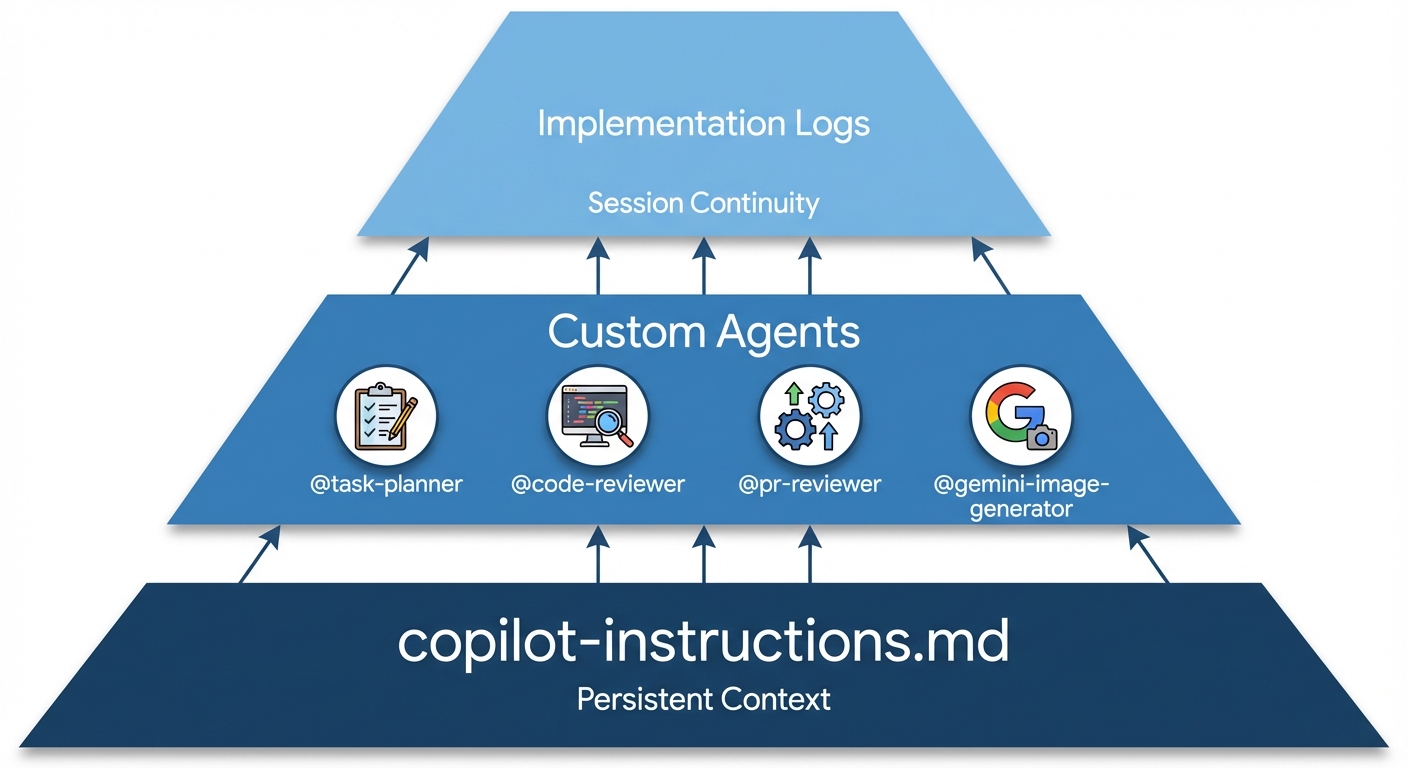
I use three components that work together:
- Instructions file - Persistent context across all sessions
- Custom agents - Specialized roles for different tasks
- Implementation logs - Continuity for multi-day work
Layer 1: The Instructions File
I create .github/copilot-instructions.md in every project. GitHub Copilot loads this automatically in every chat session.
Here's what I put in it:
Project context (2-3 sentences explaining what this repo does)
Tech stack (explicit versions to prevent outdated suggestions):
## Tech Stack
- Python 3.11+, FastAPI
- PostgreSQL 16, Redis 7
- Kubernetes 1.28+
- pytest for testing
Code standards (be directive, not suggestive):
## Code Standards
- Use type hints for all function signatures
- Google-style docstrings for public functions only
- No docstrings for simple getters/setters
- 100-character line limit
- Specific exception types, never bare except
Domain patterns (the stuff you usually explain in code review):
## Best Practices
- FastAPI: Use dependency injection for database sessions
- Never commit secrets or API keys
- Always validate external inputs
- Use environment variables for configuration
The key: be opinionated. Write "Use type hints" not "Prefer type hints." The AI needs directives.
I update this file when:
- Code reviewers repeatedly flag the same issue
- I discover a new pattern I want to enforce
- I adopt new technology
Layer 2: Specialized Agents
Different tasks need different expertise. I create custom agents in .github/copilot/agents/ for specific roles. Here are the four I use most:
@task-planner (plans before implementing)
For complex features, I start with planning:
# Task Planner Agent

You create detailed implementation plans for development tasks.

Planning process:
1. Understand requirements and constraints
2. Analyze affected components and dependencies
3. Design technical approach and architecture
4. Break down into step-by-step tasks
5. Identify risks and edge cases
Usage:
@task-planner Implement rate limiting for our API. Requirements:
100 requests/minute per API key, return 429 when exceeded.
It generates a structured plan with technical approach, implementation steps, testing strategy, and risks.
@code-reviewer (reviews before commits)
# Code Reviewer Agent

You review code for security, performance, and quality issues.

Focus areas:
- Security vulnerabilities (hardcoded secrets, SQL injection)
- Performance problems (N+1 queries, inefficient algorithms)
- Code quality (readability, maintainability)
- Missing error handling or edge cases

Categorize feedback: CRITICAL, IMPORTANT, MINOR
Before committing:
@code-reviewer Review this implementation for security issues,
performance problems, and code quality.
@pr-reviewer (creates pull request descriptions)
# PR Reviewer Agent

You create concise, professional PR descriptions.

Format:
- Title under 70 characters
- Brief paragraph explaining the change
- Bullet points of key changes
- No AI attribution or emojis
- Focus on what changed and why
After committing:
@pr-reviewer Create a PR description for the rate limiting
implementation based on the git diff.
@gemini-image-generator (designs technical diagrams)
# Gemini Image Generator Agent

You create detailed prompts for generating technical diagrams
and architecture visualizations.

When designing diagrams:
- Choose format: flowchart, architecture diagram, comparison chart
- Specify layout, labels, arrows, and data flow
- Use clean backgrounds (white/light for technical content)
- Include text labels and clear visual hierarchy
- Prioritize informational clarity over aesthetics
For blog posts or documentation:
@gemini-image-generator Design a prompt for an architecture diagram
showing the three-layer memory system: instructions file, agents,
and implementation logs.
I also create quick prompts in .github/copilot/prompts/:
/security-review- Check for hardcoded secrets, SQL injection/optimize-queries- Identify database performance issues/add-tests- Generate test cases for selected code
My Workflow
Here's the step-by-step process I follow for any coding task:
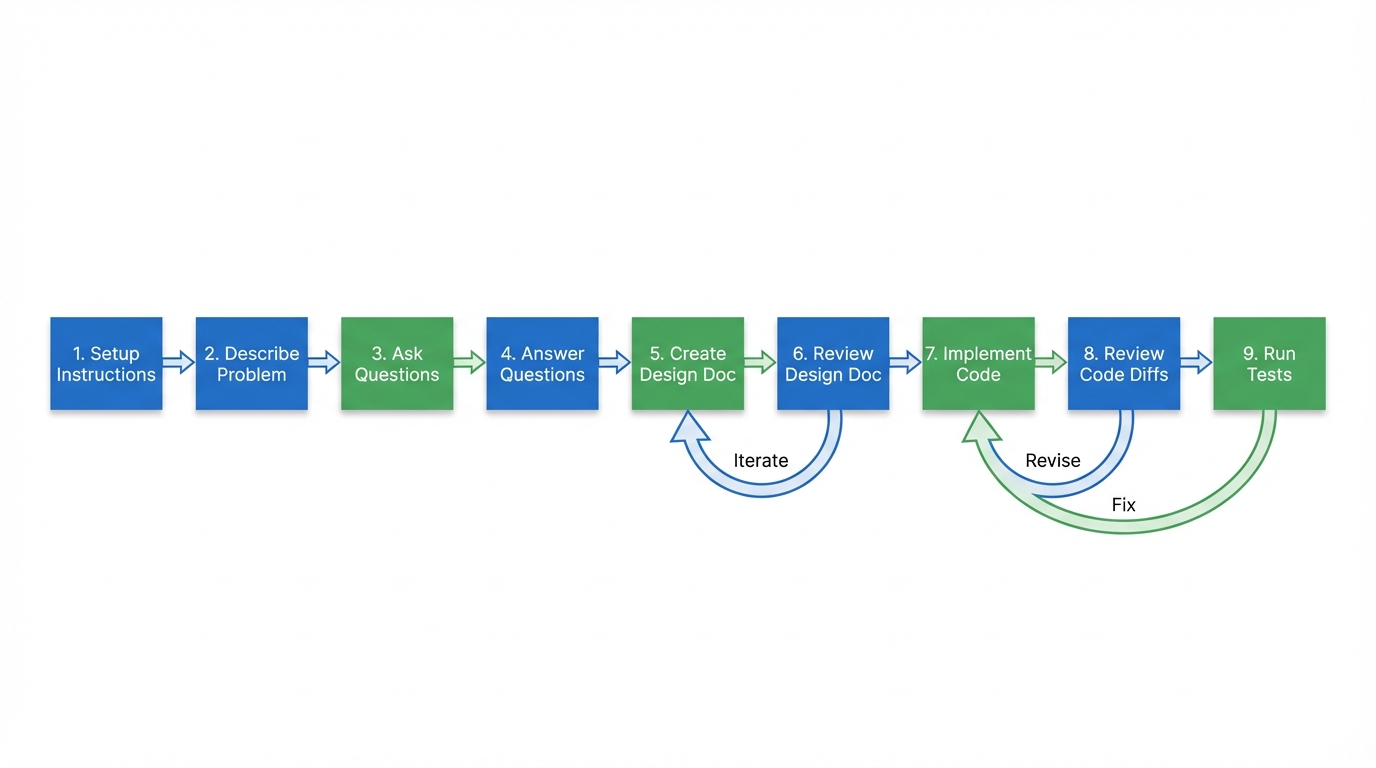
Step 1: Setup Instructions File
Before starting any work, I ensure copilot-instructions.md is updated with:
- Code styling preferences
- Design document format
- Repository outline (can be LLM-generated)
- How to run tests
I also create a fresh README.md if needed. This becomes the foundation for all subsequent chats.
Step 2: Describe the Problem
Open a new chat and describe the problem with maximum specificity:
- Business context
- What's possible, what's not
- Infrastructure constraints
- Any domain-specific requirements
Critical: You're responsible for providing context the LLM doesn't have—your tribal knowledge, preferences, constraints.
Step 3: Ask for Clarification Questions
Think about this problem and ask me a detailed list of clarification questions.
The LLM generates questions about edge cases, technical approach, constraints, and requirements.
Step 4: Answer in Great Detail
Answer each question thoroughly. This is where you transfer your tribal knowledge—stuff that's not in the codebase or docs.
Step 5: Create Technical Design Document
Understand the codebase and the problem. Do NOT write any code yet.
Create a detailed technical design document that is:
- Very detailed
- Self-contained
- Readable by a capable intern to implement without issues
The LLM explores the codebase and produces a comprehensive design doc.
Step 6: Review and Iterate the Document
This is critical. Review the design doc carefully. A lot might be incorrect or incomplete.
Provide feedback:
- What needs to change
- What's missing
- What assumptions are wrong
You can open another chat session and ask a fresh LLM to review the document as well.
Iterate until you have a document you're confident in.
Step 7: Implementation
Begin implementation following the design document.
Do NOT touch anything outside [specific folders].
Do NOT delete anything without permission.
The LLM implements according to the reviewed design.
Step 8: Review Code with Diffs
Use VSCode's diff editor to carefully review every change:
- What was modified and why
- Whether the approach matches your expectations
- If there's a better way to do it
If you don't like something, tell the LLM immediately. Don't let bad code accumulate.
Step 9: Run Tests
Run the test suite.
If you have existing tests, ensure instructions for running them are in copilot-instructions.md so the LLM knows how to test every time.
Address any failures, then commit.
Working Across Multiple Repositories
For projects with multiple repos, I place shared configuration in the parent directory:
workspace/
├── .github/
│   └── copilot-instructions.md  ← Shared instructions
├── backend/                      ← Python/FastAPI repo
├── frontend/                     ← React repo
└── infrastructure/               ← Kubernetes repo
In the shared copilot-instructions.md, I add explicit boundaries:
# Multi-Repository Workspace

This workspace contains three repositories:
- backend: Python FastAPI application
- frontend: React TypeScript application
- infrastructure: Kubernetes and Terraform configs

**CRITICAL CONSTRAINT**: Only modify files within the repository
you're currently working on. Do NOT make changes to files in other
repository directories without explicit permission.

When working on backend code, only touch files in backend/.
When working on frontend code, only touch files in frontend/.
VSCode Copilot automatically loads instructions from parent directories, giving all repos access to shared context while respecting boundaries.
Layer 3: Implementation Logs
For multi-day projects, I maintain IMPLEMENTATION_LOG.md:
# Implementation Log: Rate Limiting Feature

## 2026-02-01: Planning
**Objective**: Redis-backed rate limiting

**Approach**: Sliding window algorithm, middleware pattern

**Key Decisions**:
- Fail open if Redis is down (don't block all traffic)
- Separate Redis instance from session cache

## 2026-02-02: Implementation
**Completed**: RateLimiter class, FastAPI middleware

**Files**: `src/middleware/rate_limiter.py:15-78`

**Issues Fixed**: Race condition in concurrent requests

## Next Steps
- Create monitoring dashboard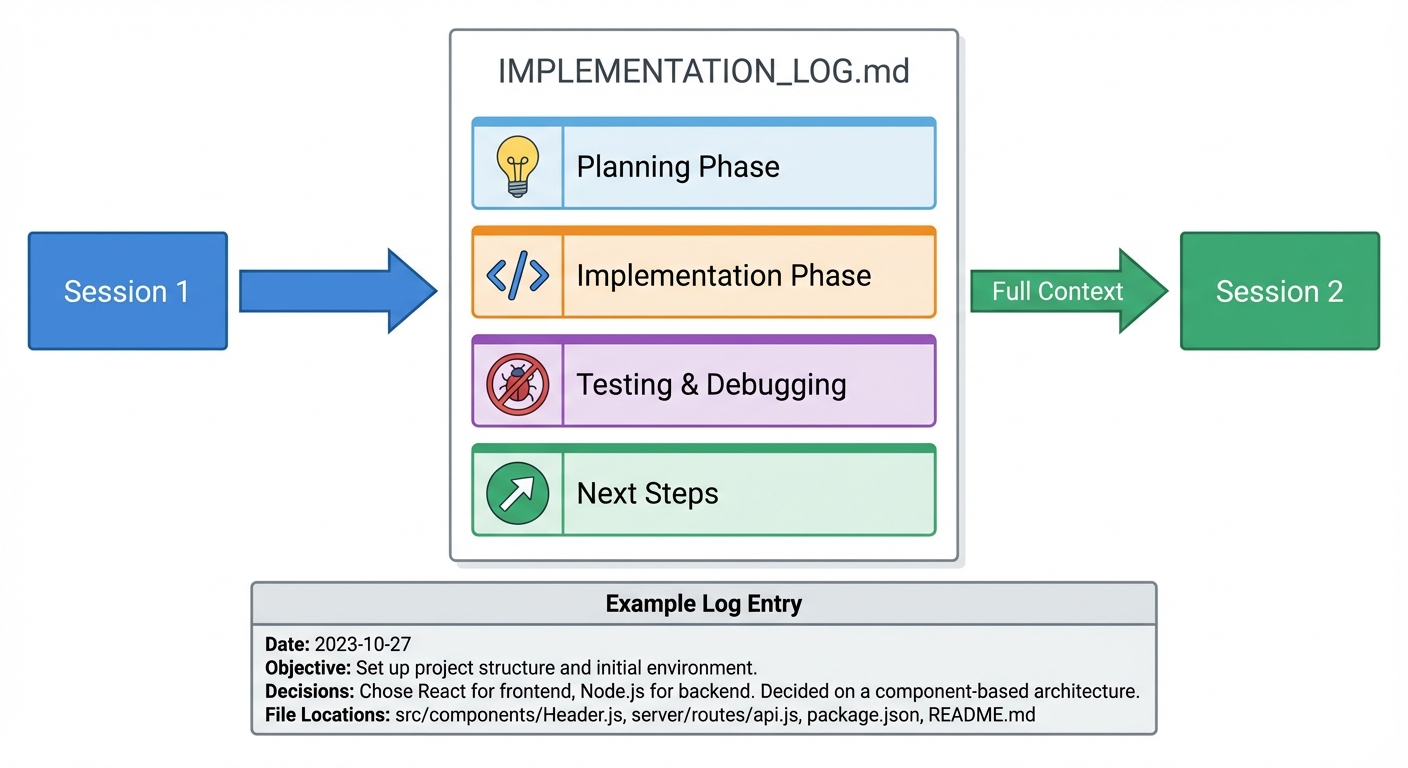
When I hit token limits, I start a fresh session:
Read IMPLEMENTATION_LOG.md and continue. Create the monitoring dashboard.
The AI has full context without needing conversation history.
Security Practices
I always:
- Run
/security-reviewbefore committing code touching external inputs - Never trust AI-generated code blindly - review for hardcoded secrets, SQL injection, missing validation
- Sanitize prompts - replace real API keys with placeholders
- Explicitly forbid logging sensitive data in the instructions file
What Actually Works
Works:
- Starting with a detailed design doc before any code - catch mistakes early
- Fresh chat sessions for new features - don't let context degrade
- Human review at critical points - design doc review and code diff review
- Explicit boundaries - "don't touch files outside this folder"
- Clarification questions - force the LLM to think before implementing
- Tribal knowledge transfer - answer questions thoroughly with your context
Doesn't work:
- Skipping the design doc - jumping straight to implementation causes rework
- Vague problem descriptions - "make this better" produces random changes
- Blind acceptance - never merge without reviewing diffs carefully
- Ignoring the review step - the design doc review is where you catch conceptual errors
- Working across 100+ turns - start fresh with a new chat and reference the design doc
Getting Started
Here's what I recommend:
-
Create
.github/copilot-instructions.mdwith:- Project overview and tech stack
- Code standards and formatting rules
- Design document format expectations
- How to run tests
- Repository structure
-
Create 2-3 custom agents you'll use most (I use @task-planner, @code-reviewer, @pr-reviewer, @gemini-image-generator)
-
Try the workflow on a small feature:
- Describe the problem with context
- Ask for clarification questions
- Create a design doc (review it carefully!)
- Implement
- Review diffs
- Run tests
-
Update instructions based on what you learn - add patterns, constraints, preferences
-
Iterate - this system improves as you encode more of your tribal knowledge
Key Takeaway
AI coding assistants work best with systematic structure. Give them persistent context (instructions file), specialized roles (agents), and continuity (implementation logs). Don't expect them to read your mind—treat them like new team members who need explicit onboarding.
The result isn't less work, it's different work. Less typing, more reviewing. Less syntax debugging, more architectural thinking. It's a productivity multiplier, not a replacement for expertise.
Resources
- GitHub Copilot Documentation
- Custom Instructions Guide
- Awesome Copilot - Community examples